IAS (Individual Access Services)
This page describes Areti Health’s Individual Access Service under the Trusted Exchange Framework and Common Agreement (TEFCA): what it does, how to register for it, and how to withdraw your consent. How we handle the information itself is set out in our TEFCA Privacy and Security Notice.
1About Individual Access Services
Areti’s Individual Access Service (IAS) is a secure digital service that lets individuals request their health records from connected hospitals, clinics, and health systems, then routes that information into a structured, clinically useful view.
The IAS leverages our deep integrations with networks that participate in TEFCA to collate records from across the United States. Areti’s data platform then standardizes, deduplicates, and organizes that information for patients, care teams and partners.
2Request-only IAS Provider
3Requesting Access to the Areti IAS Portal
You can register for Individual Access Services in either of two ways.
- Sign in to the Areti PortalGo to customers.aretihealth.com/login and register for Individual Access Services there.
- Or contact usEmail contact@aretihealth.com and we will send you instructions on how to log in.
4Removing Your IAS Consent
You may withdraw your consent at any time. To request to review, update, or delete your personal information, fill out and submit a data subject access request. Open the Data Subject Access Request form, then follow the steps below. The numbers on the form below match the numbered steps.
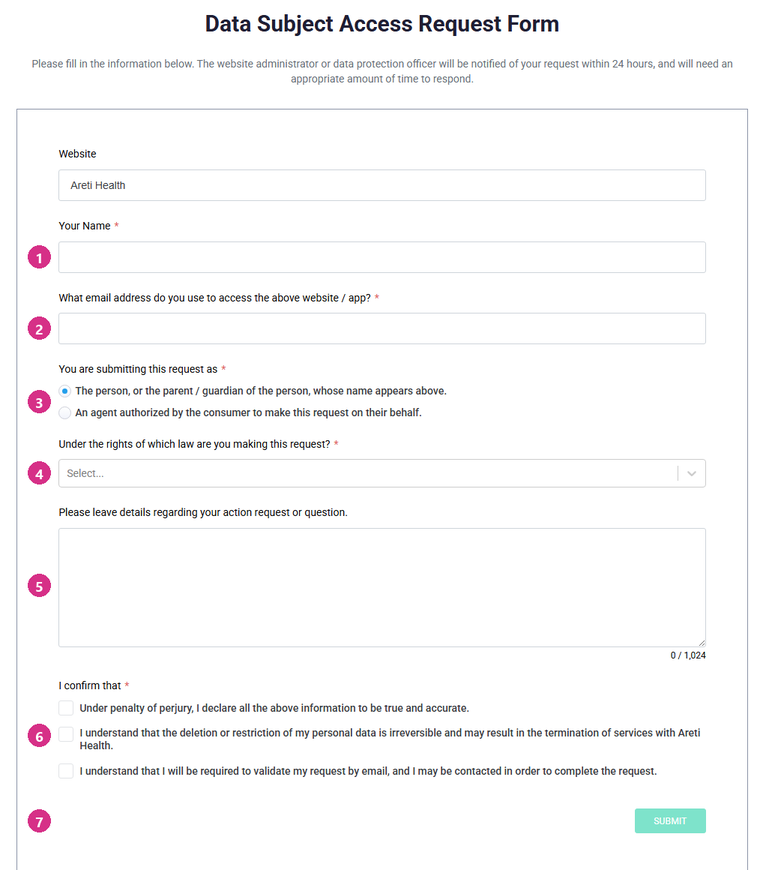
- Your name. The name Areti holds for you, so we can match the request to your record. Example: Jane Q. Sample
- Your email address. Use the address you gave Areti. The confirmation email in step 7 goes here. Example: jane.sample@example.com
- Who is submitting the request. Leave the first option selected if the request is about your own information, or if you are the parent or guardian of the person named. Choose the second only if you are an agent that person has authorized.
- The law you are making the request under. The list offers GDPR, CCPA, CPA, CTDPA, UCPA, VCDPA and OTHER. TEFCA is not one of the choices, so unless one of those state or EU laws applies to you, choose OTHER and describe your request in step 5. Example: OTHER
- The details of your request. Say plainly what you want to happen. You can copy the wording below. I am withdrawing the consent I gave Areti Health for TEFCA Individual Access Services. Please delete the medical records retrieved under that consent and stop any future TEFCA queries made on my behalf.
- The three confirmations. All three must be ticked before the form will send. The second one is worth reading twice: deleting your information cannot be undone, and it may end services you are using.
- Submit. You will be sent an email asking you to validate the request, and it is not complete until you do. Areti is notified within 24 hours.
Completing and submitting the form will remove existing information in the Areti Platform and revoke authorization for future TEFCA IAS queries effective immediately.
If you would rather not use the form, or you have questions about your consent or about this service, email contact@aretihealth.com.